How to organize a potluck so nobody brings the same thing
To organize a potluck, pick a date, decide what you will cover yourself, write a list of items with a number on each, and share one link where guests claim what they bring. The number is what stops doubles: "dessert" invites three desserts, while "pie, 3" closes after three.
Below are the steps, a potluck list example, and what changes for a crowd of 40.
One clean page for your group chat. Guests tap an item and type a name. Free, with no account, no app and no ads.
How do you organize a potluck, step by step?
Six steps cover almost every potluck, from a book club to a block party. Each one is small. The skipped step is usually the third.
- 1. Pick the day and the headcount. Ask who is coming before you build the list, because the list is sized to the number of people.
- 2. Decide what you cover. Hosts usually take the main dish, or the drinks, or the space. Say so up front so guests know what is left.
- 3. Write the list with a number on every item. Sides, desserts, drinks, plates, cups, a second table. Count the gear like food.
- 4. Share one link. Post it where the group already talks and say what to do in one sentence: "Tap what you are bringing and type your name."
- 5. Check in once. A few days before, look at the list and message the people who have not claimed anything.
- 6. Plan the day. Label dishes, put out serving spoons, and keep an eye on the clock for food that sits out.
How do you plan a potluck?
Start from the people, not the menu. Write down how many are coming, whether there are children, and whether anyone has an allergy. Those three facts decide how many dishes you need and what to label.
Then choose a shape. A full meal needs a main, sides, a dessert and drinks. A lighter event, such as a weekend afternoon, can be starters and desserts only. Say which one in the invitation, or you will get a table of nothing but chips.
For headcount-based lists, the Friendsgiving who brings what page has dish counts for 6, 10, 15, 20 and 30 guests that work for any sit-down potluck.
What is the best way to coordinate a potluck?
The best way to coordinate a potluck is one list that everyone can see and that stops a full item from being claimed again. A group text has no memory. Claims scroll away, people change their minds out loud, and you end up holding the list in your head.
A shared spreadsheet fixes the memory but not the doubling, because two people can type the same dish into two rows. The Google Sheets guide shows where that breaks. A sign-up page built for this closes an item the moment it is full.
If you are choosing a tool, the comparison of potluck sign-up tools names the right one for reminders, payments and quantities.
How do you set up a potluck list?
Give each line three things: what it is, how many, and a short note if it matters. "Mac and cheese" is a dish. "Main dish, 2, one vegetarian" is a slot, and slots are easier to fill because a guest sees what the table needs.
The page has no date field, so put the date in the event name, like "Block party, Saturday June 6". Here is a potluck list example for 10 guests. It is a made-up example with planning choices, not a sourced rule, and your list will differ.
A made-up potluck list example for 10 guests. The quantities are planning choices, not a sourced rule.
| Item | How many | Note |
|---|---|---|
| Main dish | 2 | One of them vegetarian |
| Side dish | 4 | At least one vegetable |
| Starter | 1 | Something to eat while people arrive |
| Dessert | 2 | One without nuts |
| Drinks | 3 | Include one non-alcoholic |
| Plates, cups, napkins | 1 | For all 10 |
| Serving spoons | 1 | One per dish, from the host |
How do you organize a potluck online?
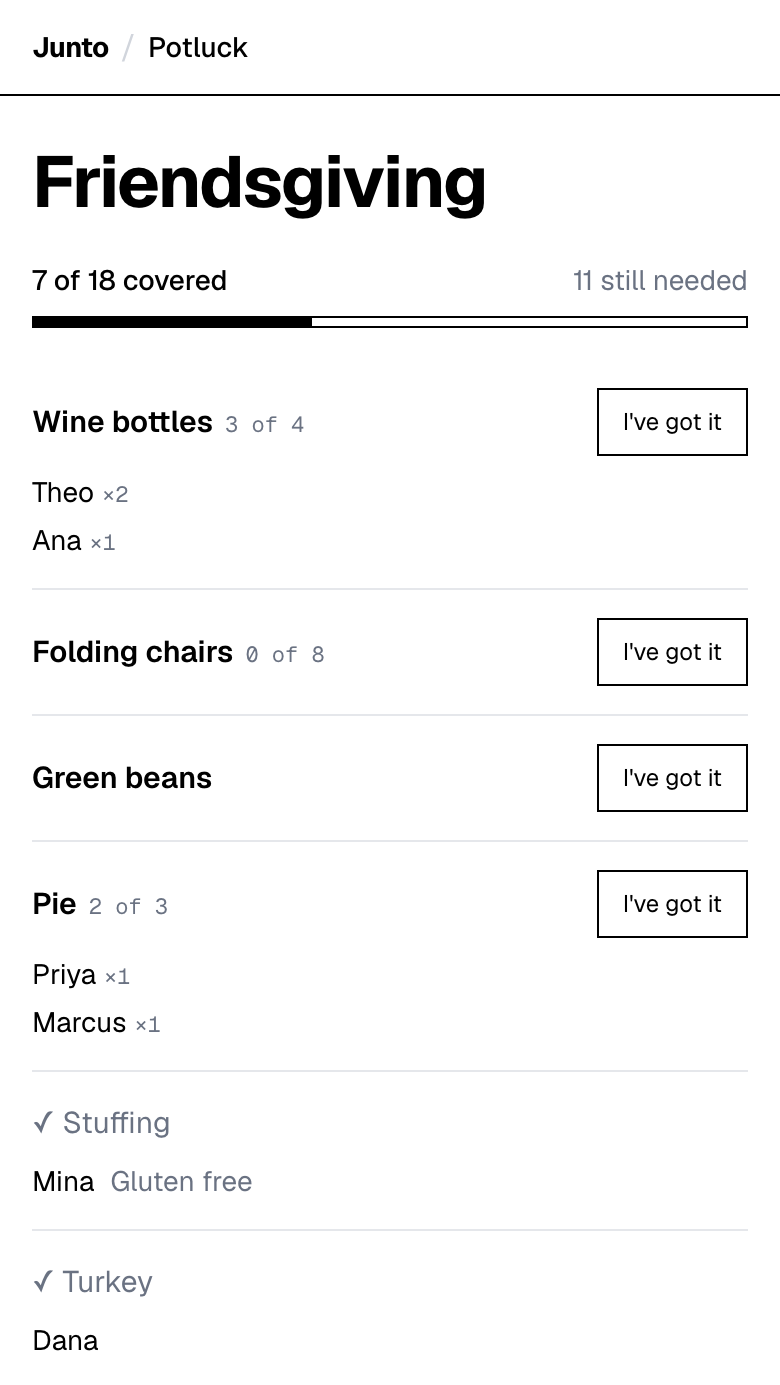
Organizing a potluck online means putting the list on a web page instead of passing it around in messages. Junto's potluck page at tryjunto.app/potluck is a free sign-up list where guests tap an item and type a name.
You enter an event name, your items with quantities, and your own name and email. You get a guest link to share and an admin link to keep. Guests need no account and no app, and you create no password. An item that is full closes, and the page shows who has what.
How do you organize a potluck for 40 people?
At 40 people, count dishes and servings, not guests. One dish rarely serves 40, so ask for fewer, larger contributions. The University of Minnesota Extension gives the rule: a recipe that yields 50 one-cup servings feeds 50 people if each takes one serving.
Where there is a turkey, the sourced amount is 1 pound of whole turkey per person, so 40 guests need 40 pounds across however many birds you roast. For everything else, no source we found gives a per-person amount, so we do not invent one.
Split the list into zones so people can find their slot: mains, sides, desserts, drinks and gear. Put the sign-up link in an email or a channel, and ask one helper to check the list with you. For a work crowd, see the office potluck guide.
What should you do on the day?
Put out a card or a note by each dish with its name and main ingredients. It answers the allergy question before anyone asks.
Watch the clock. USDA guidance is that perishable food should not sit out more than 2 hours, or 1 hour when the temperature is above 90 degrees F. Hot food belongs at 140 degrees F or warmer and cold food at 40 degrees F or colder, so use slow cookers, warmers and ice.
Keep a few spare plates and spoons in a bag. The list covers what you planned for, and something always runs short.
What can an online potluck list not do?
The Junto potluck page has no automatic reminders, no payment collection, no printable sheet, no QR code, no RSVP and no recurring sign-ups. It has no structured dietary field either, only an optional free-text note on an item.
Message the group yourself a day before. If you need reminders or money collected, pick a heavier tool from the comparison page.
One clean page for your group chat. Guests tap an item and type a name. Free, with no account, no app and no ads.
Questions
How do I organize a potluck for the first time?
Pick a date, ask who is coming, then write a list of items with a number on each. Share one link so guests claim what they bring and nobody doubles up. Junto makes that page free, with only a name needed from guests. Write your list today and post the link in your group chat.
What is the best way to coordinate who brings what?
Use one shared list where a full item closes. A group text loses claims and a plain spreadsheet allows duplicates. Junto gives each item a quantity, shows who has what, and stops a claim once the item is full. Put your quantities on the list first, then share the guest link.
How do I make a potluck list?
Write each item as a slot with a number, such as "side dish, 4", then add gear like plates and serving spoons. Put the date in the event name. Junto lets you add a short note or link to any item for details like "vegetarian". Start with the main dish and fill outward.
Can I run a potluck online with no account for guests?
Yes. Guests open the link, tap an item and type a name. Junto needs no account or app from them, and you only give a name and email to receive your two links. It sends no reminders, so message the group yourself. Share the guest link and keep the admin link private.
Sources
- University of Minnesota Extension: Planning the quantity of food for an occasion (yield and servings) (checked 2026-11-03)
- University of Nebraska-Lincoln Extension: Turkey 101 (1 pound of whole turkey per person) (checked 2026-11-03)
- USDA FSIS: Keep Food Safe (2 hours, 90 degrees F, hot and cold temperatures) (checked 2026-11-03)
Related
- Use cases: Potluck sign-up sheet: pages for every kind of event
- Guides: How to ask guests to bring a dish: 10 messages to copy
- Use cases: Friendsgiving sign-up sheet that stops doubled dishes
- Use cases: Office Thanksgiving potluck sign-up that coworkers use
- Guides: How much food for a potluck: sourced amounts and times
Last updated 2026-11-03