How to ask guests to bring a dish, with 10 messages you can copy
To ask guests to bring a dish, say it is a potluck, name what you are covering, and give them one easy way to pick their dish. Be specific, say that store-bought is fine, and put a deadline on it. Guests say yes to a clear small ask and ignore a vague one.
Below are ten messages you can paste, grouped by situation, plus the four rules that make any of them work.
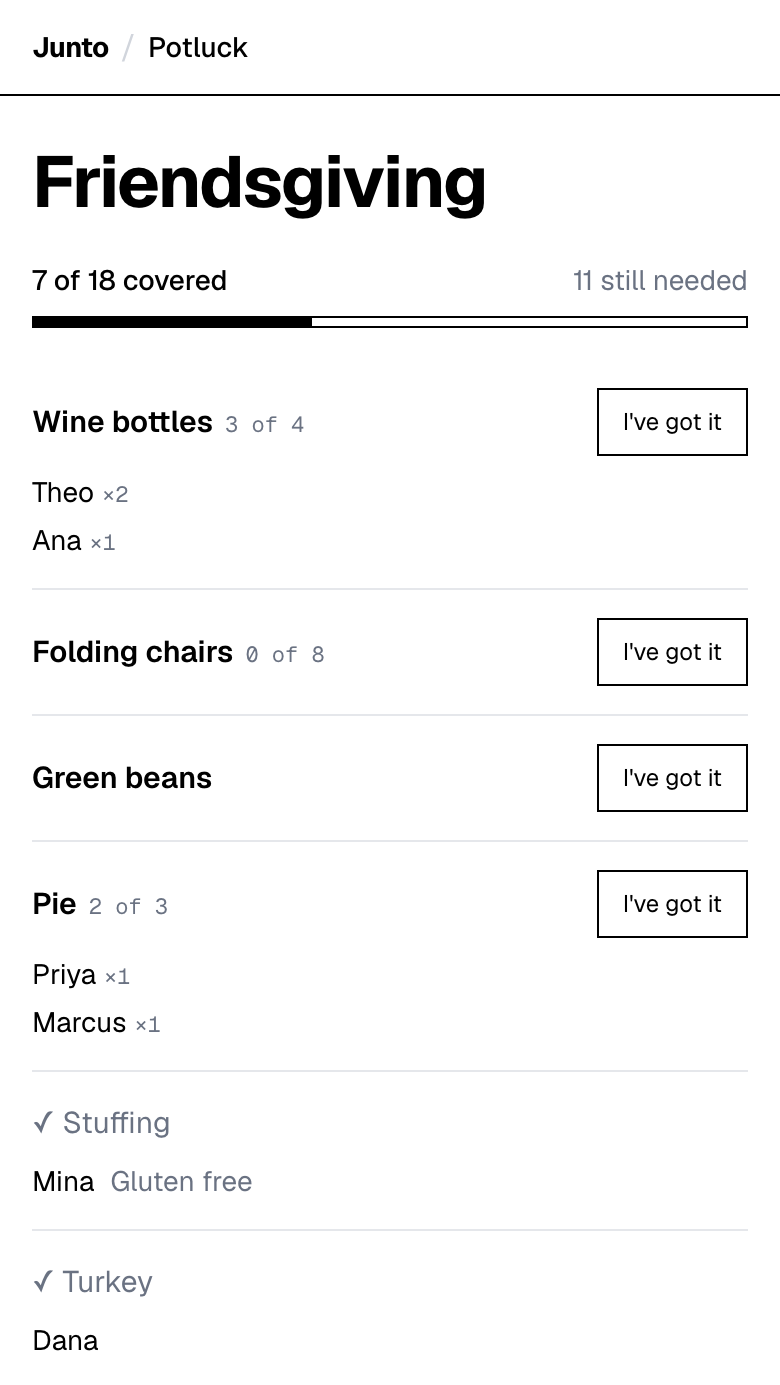
Put the link in your message. Guests tap an item and type a name. Free, with no account, no app and no ads.
How do you politely ask guests to bring a dish?
Four rules make the ask polite. Say it is a potluck in the first line, so no one feels tricked. Tell guests what you are making, so they know what is left. Say that buying a dish counts. Give a date to reply by.
Then give them the easy way to answer. Replying "I will bring a salad" in a group chat is the step where lists fall apart, because the next three messages bury it. Send a link where the guest picks an item and types a name, and the list stays in one place.
Every message below uses (link) where your sign-up link goes. Change the day, the time and the dishes.
What do you text friends to ask them to bring food?
Message 1, the short version. "Potluck at mine on Saturday the 14th, 6pm. I'm making the main. Tap what you want to bring here: (link). It takes ten seconds and you only type your name."
Message 2, for a group chat that likes options. "Bring something to share. Anything on the list is fair game, and store-bought is totally fine. When you claim an item it shows up for everyone, so we won't end up with four desserts. (link)"
What is the wording for a bring-a-dish-to-share invitation?
Message 3, one line for an invitation. "This is a potluck. Please bring a dish to share and pick it at (link) so we don't double up."
Message 4, a warmer invitation line. "Come hungry and bring something to share. Tell us what you're bringing at (link). Buying a dish is welcome, we just want a full table."
The page has no date or time field, so put the date in the event name and in the invitation text itself. It also has no printable sheet, so on a paper invitation you will have to write the link out by hand.
How do you ask family to bring a dish?
Family has two problems. Some relatives avoid anything that needs a download, and some have a dish that is not the holiday without them. Cover both.
Message 5, for relatives who avoid apps. "We're doing it potluck style this year. There is nothing to download and no account. Open this link, tap what you'd like to bring, and type your name: (link). If that's a hassle, just tell me and I'll tap it for you."
Message 6, for the dish nobody else can make. "Is there something that isn't the holiday without you? Tell me and I'll put it on the list under your name so no one else brings it. The rest of the list is here: (link)"
How do you ask coworkers to bring food?
At work, the fear is that people feel pressured or cannot cook. Take that off the table in the first sentence.
Message 7, for a team channel. "We're doing a potluck lunch on Thursday. Store-bought counts, and drinks and plates are real slots too. Pick yours here, no login needed: (link). If you have an allergy, add a short note when you take your item."
For more on running one, see the office potluck guide.
How do you ask guests about dietary restrictions and allergies?
Ask early and ask for something specific. "Any dietary restrictions?" gets silence, while "Anyone with an allergy I should plan around?" gets answers.
Message 8, the allergy question. "Does anyone have an allergy or dietary need I should plan for? Reply by Thursday and I'll mark it on the list. If you bring a dish, add a short note on the sign-up with what's in it, like 'contains nuts'."
The page has no structured dietary field. A guest taking an item can add a free-text note, such as "Gluten free", and the organizer can name a slot like "vegetarian main". A guest cannot edit their note after saving it. For a serious allergy, also put an ingredient card by the dish on the day.
How do you ask someone to bring a side dish?
Message 9, a specific ask. "Could you bring a side dish? Something that travels well, like roasted vegetables or a salad, would be perfect. There are open slots here: (link)"
A named category beats a blank. People who say they cannot cook still say yes to "a side that travels well", because it tells them what is wanted.
What do you say to a guest who has not signed up?
Message 10, the nudge. "Quick check: the list still has two open slots, rolls and drinks. Want one? Tap it here before Thursday: (link)"
Name the open items. A reminder that says "please sign up" is easy to skip, while "rolls and drinks are open" gives the guest a thing to say yes to. Send it once, a few days before, to the people who have not claimed anything.
Junto's potluck page at tryjunto.app/potluck is a free sign-up list where guests tap an item and type a name. It sends no reminders, so the nudge is yours to send.
What should you not do when you ask?
Do not assign dishes by name in a public thread, because it feels like a test. Do not ask for a recipe or a photo. Do not leave the list open ended, with no date.
If you need the full planning picture, read how to organize a potluck.
Put the link in your message. Guests tap an item and type a name. Free, with no account, no app and no ads.
Questions
How do I politely ask guests to bring a dish?
Say it is a potluck up front, tell them what you are making, and say that store-bought is fine. Give a date to reply by and one link to answer. Junto lets guests tap an item and type a name, so the reply is quick. Copy message 1 above and fill in your details.
What is good wording for a bring-a-dish-to-share invitation?
Keep it to one line: "This is a potluck. Please bring a dish to share and pick it at (link) so we don't double up." Junto gives you the link, and guests need no account to use it. Put the date in the invitation text and in the event name, because the page has no date field.
How do I ask people to bring a side dish?
Name a type, not a blank. Say "a side that travels well, like roasted vegetables or a salad", then link the open slots. Junto shows which slots are still open and closes a full one, so guests pick something that is actually needed. Send the link with a reply-by date.
How do I ask guests for dietary restrictions?
Ask early and be specific: "Does anyone have an allergy I should plan around?" Then ask each dish-bringer to note what is in it. Junto supports an optional free-text note on an item but has no structured dietary field. Collect answers by a set day, then add a card by each dish.
How do I chase someone who has not signed up?
Send one message that names the open items, such as "rolls and drinks are still open", with the link. A specific slot is easier to accept than a general reminder. Junto sends no automatic reminders, so send this yourself a few days before the event, only to the people who have not claimed anything.
Related
- Guides: How to organize a potluck: six steps and a list example
- Use cases: Potluck sign-up sheet: pages for every kind of event
- Use cases: Thanksgiving potluck sign-up sheet for the whole family
- Use cases: Office Thanksgiving potluck sign-up that coworkers use
- Use cases: Friendsgiving sign-up sheet that stops doubled dishes
Last updated 2026-11-03