How to run an office Thanksgiving potluck with a sign-up everyone can use
An office Thanksgiving potluck needs one list that everyone can open without logging in, with a quantity on every item so the team does not end up with six bags of chips. Post the link in Slack or email, and coworkers tap an item and type a name.
This guide covers what to list, how to share it, how to handle allergies, and what the page cannot do.
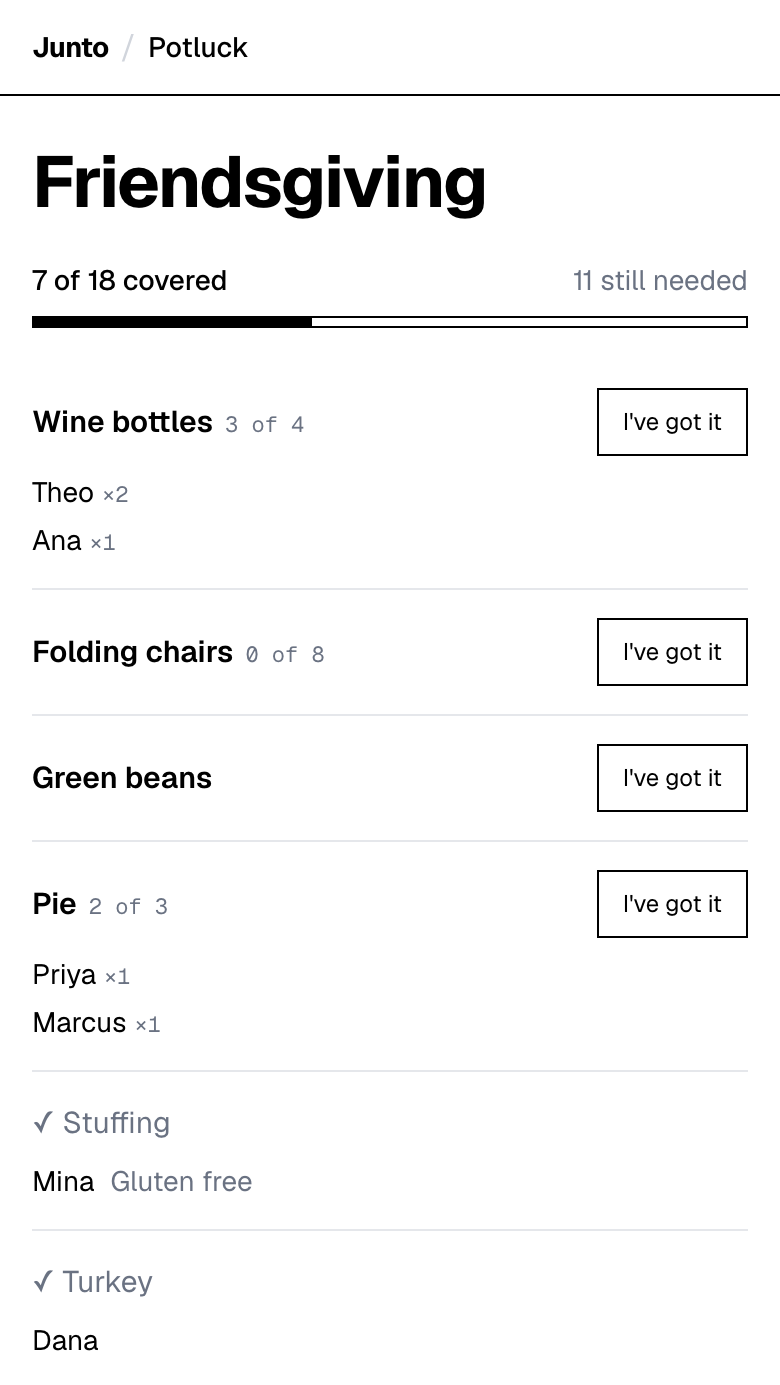
One link for Slack or email. Coworkers tap an item and type a name. Free, with no account, no app and no ads.
Why does an office potluck go wrong?
Most office potlucks fail in the same three ways. Two people bring the same dish, nobody brings plates, and the person who is allergic to nuts cannot tell which dish has them.
All three come from a list that has no numbers and no notes. A line that says "sides" collects six sides of the same kind. A line that says "plates, 30" gets claimed once and closes.
What should an office Thanksgiving potluck list include?
Think in roles, not dishes. At work, most people will not cook, so the list needs slots that a grocery run can fill.
- Mains: one or two. A rotisserie turkey from a store counts, and for a group over 20 you can use the sourced turkey amount of 1 pound per person.
- Sides: one line per kind, so you can see the mix.
- Desserts: with a quantity.
- Drinks: coffee, cider, sparkling water.
- Supplies: plates, forks, napkins, serving spoons, foil, a slow cooker or two. These are the slots people forget and the ones that rescue the day.
- Cleanup: one line for whoever takes the trash out and the leftover containers.
How do you share the sign-up in Slack or email?
Paste the guest link into your channel or send it in an email. Coworkers open it in a browser and tap an item. No one has to be in your workspace for the link to load, so contractors and part-timers can join too.
Keep the admin link to yourself. Pinning the guest link to the channel means the latest list is always one click away.
How do you handle allergies at a work potluck?
Ask everyone who brings a dish to say what is in it. The tool lets a guest taking an item add a short free-text note, for example "Contains peanuts" or "Gluten free". Organizers and guests who add an item can attach a note or a link too.
Know the limit. It is free text, not a structured dietary field, so the page cannot filter by allergen. A guest cannot edit their note after saving it. For anything serious, also put a card with the ingredients next to the dish on the day.
Name the safe slots in the item itself, such as "nut-free dessert" or "vegetarian main", so the person who needs them finds them on the list.
How do you get a big team to sign up without accounts?
Remove the steps. A coworker should be able to go from your message to a claimed item in two taps and a name.
The page asks guests only for a name. Quantities let several people share one item, such as five bottles of sparkling cider, with each person picking how many they take. The page shows who has what, and an item closes when it is full, so two people cannot over-claim it.
How do you organize a potluck at work, and is there a free sign-up sheet?
To organize a potluck at work, pick one organizer, choose a lunch window, list every item with a quantity and post one link in Slack or email. Coworkers claim items without logging in.
A free office potluck sign-up sheet that does this is the page you can make at tryjunto.app/potluck. It is online only, so there is no printable version for the break-room wall.
How much food does a team of 20 or 30 need?
Use the lists on the who brings what by guest count page. They are written for a friend group, but the numbers scale to a team: turkey at 1 pound per person, then one slot per dish.
For serving and holding rules, read how much food for a potluck. In short, USDA guidance is that perishable food should not sit out more than 2 hours, so plan the lunch to end inside that window and use slow cookers or warmers for hot dishes.
What about food safety in the office kitchen?
USDA guidance is that perishable food should not sit out more than 2 hours, or 1 hour above 90 degrees F. In an office, that means a lunch window, not an all-afternoon spread.
Hot dishes need a slow cooker or a warming tray, and cold dishes need the office fridge. Put those needs on the list as items, such as "fridge space" and "extension cord", so the person who runs out of room is not you at 11:55.
Leftover turkey keeps 3 to 4 days in the refrigerator, according to Illinois and Minnesota Extension. Ask people to take their own dishes and leftovers home that afternoon, and pass the container slot to someone reliable.
How do you keep it fair for people who cannot cook?
Make buying acceptable and say so in the first message. A work potluck works best when a store-bought dish counts as much as a homemade one.
Give the non-cooks real slots: drinks, ice, plates, napkins, a store pie. Those are as necessary as any casserole, and they are the slots that otherwise stay empty until the morning of.
If some teammates are remote or part-time, give them the slots they can fill from home, like a recipe link for a shared dish or a donation of drinks to be shipped to the office.
Who should organize it, and what can they not do?
Pick one person. They enter the event name and items, plus their name and email, and the page sends them the guest link and the admin link. They create no account and no password.
The page does not send reminders, collect money for a catered main, print a sheet, take RSVPs or repeat for next year. Put the date in a team calendar invite and add a Slack reminder the day before. If you do need automatic reminders or payment collection, see the best potluck sign-up tools.
One link for Slack or email. Coworkers tap an item and type a name. Free, with no account, no app and no ads.
Questions
How do I organize an office Thanksgiving potluck?
Choose one organizer, set a date and list every item with a quantity. Share one link in Slack or email and let coworkers claim items. Junto builds that page with no account needed for guests. Open the admin link a few days ahead and fill any gaps with a direct message.
Do coworkers need an account to sign up?
No. Coworkers open the link, tap an item and type a name. There is no app and no password. The organizer enters a name and email but creates no account. Junto works from any browser. Post the guest link where your team already talks and keep the admin link private.
How do I keep track of allergies at a work potluck?
Ask each person to add a short note when they take an item, such as "Contains nuts". Junto supports that free-text note but has no structured dietary field, and a guest cannot edit it later. Put an ingredient card by each dish on the day and name safe options in the item title.
Can I share the sign-up with remote coworkers?
Yes. Anyone with the link can open it, so remote coworkers can see what is covered and claim supplies or drinks. Junto has no RSVP or location feature on this page. Post the link in your team channel and tell remote staff which items suit them, like desserts shipped or a recipe link.
What if I need payment or reminders for the potluck?
The Junto potluck page has neither. For automatic reminders, SignUpGenius includes them on its free plan. For collecting money, it offers payment collection from its Starter plan, with a 5% plus $0.50 per-transaction fee. Pick based on whether you need those features, then set your date and share the link.
Is there a free office potluck sign-up sheet?
Yes. Junto makes one free: you list items with quantities, share one link, and coworkers claim an item by typing a name, with no login. It has no printable version, no reminders and no payments. Write your list, then post the link in your team channel or an email.
Sources
- SignUpGenius: free plan, reminders, payment collection and fees (checked 2026-11-03)
- University of Nebraska-Lincoln Extension: Turkey 101 (1 pound per person) (checked 2026-11-03)
- USDA FSIS: Keep Food Safe (perishable food out no more than 2 hours) (checked 2026-11-03)
Related
- Use cases: Potluck sign-up sheet: pages for every kind of event
- Guides: Thanksgiving potluck ideas for the organizer: 12 ways
- Guides: Friendsgiving who brings what, by guest count (6 to 30)
- Guides: How much food for a potluck: sourced amounts and times
- Compare: Best potluck sign-up tools, compared with dated facts
Last updated 2026-11-03