A Friendsgiving sign-up sheet that stops three people bringing pie
A Friendsgiving sign-up sheet works when every dish has a quantity and each claim shrinks it. Then the third person who wants pie sees that pie is already taken and picks something else. It's free, and guests tap an item and type a name, so even your least techy friend can use it.
The page below shows how it works, what to put on the list, and what it cannot do.
One clean page for your group chat. Guests tap an item and type a name. Free, with no account, no app and no ads.
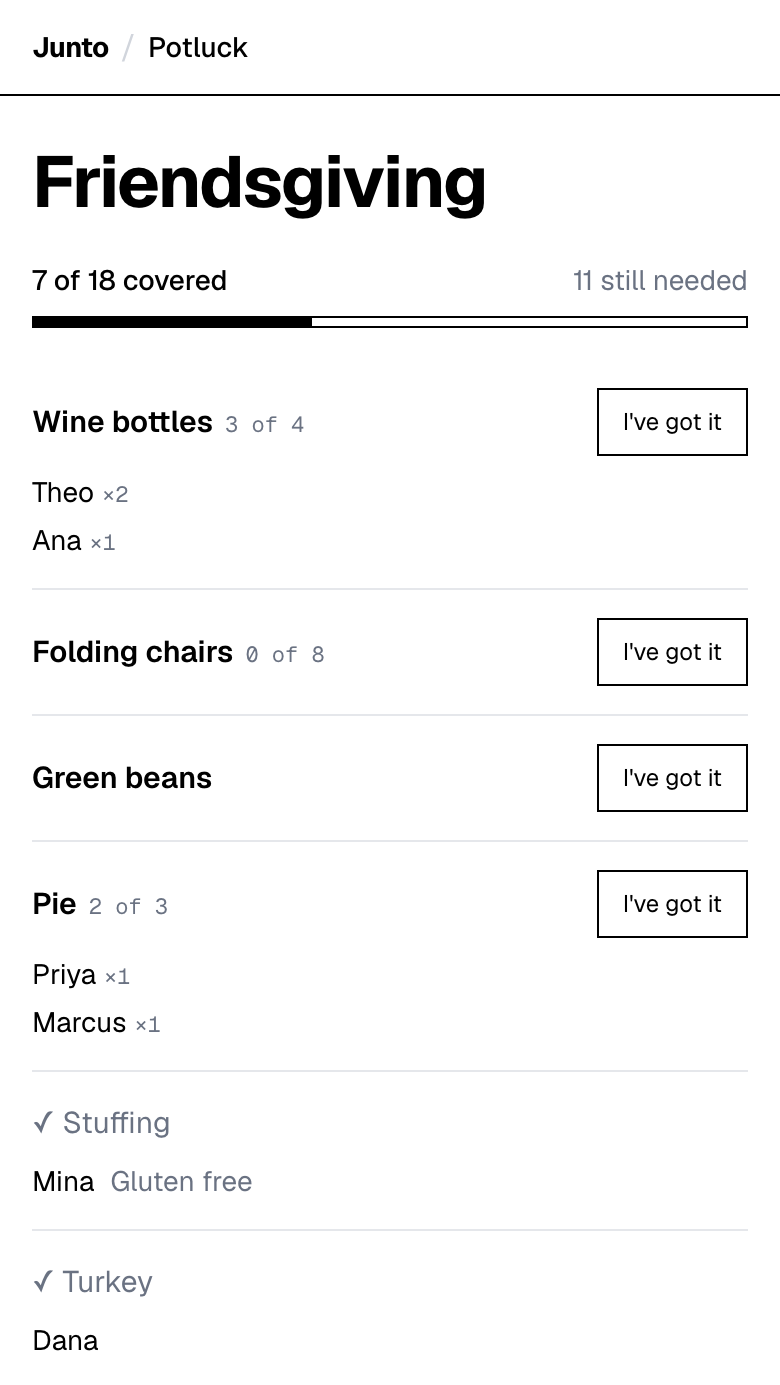
What does a Friendsgiving sign-up look like?
Here's an example, made up to show the flow. Say you're hosting 12 friends on Saturday, November 21, 2026, the weekend before Thanksgiving. You take the turkey. Everything else goes on a list, and you post the link in the group chat.
Twelve guests at one pound of turkey each (the USDA and university extension rule) means a 12 pound bird, or 18 pounds if you want leftovers. So the list opens with that one line already claimed by you, and everything else open.
Over the next hour, Theo takes 2 of the 4 wine bottles and Ana takes 1. Rui and Sam split the 8 folding chairs, 4 each. Mina takes the stuffing and adds a note, "Gluten free". Priya takes one of the 3 pies and Marcus takes another. Then Jo and Sam both tap the last pie. Jo gets there first, the pie closes, and Sam sees it is taken and picks rolls instead.
Here is the finished list for the example.
An invented example list for 12 guests. Names and quantities are made up. Your list will differ.
| Item | How many | Who has it |
|---|---|---|
| Turkey (12 lb for 12 guests at 1 lb each) | 1 | Dana (host) |
| Mashed potatoes | 1 | Lee |
| Stuffing | 1 | Mina (note: "Gluten free") |
| Green vegetable dish | 1 | Ola |
| Cranberry sauce | 1 | Kai |
| Rolls | 1 | Sam |
| Pie | 3 | Priya, Marcus, Jo |
| Wine bottles | 4 | Theo (2), Ana (1), 1 still open |
| Folding chairs | 8 | Rui (4), Sam (4) |
Turkey amount: 1 pound per person, from the USDA and University of Nebraska-Lincoln Extension (see Sources).
How do you stop three people from bringing pie?
Give pie a number. A list that says "dessert" invites three desserts. A list that says "pie, 3" lets three people each take one and then closes the line.
The same trick works for anything your group buys in units: wine bottles, bags of ice, bread, folding chairs. Each person picks how many they take, and the page shows who has what. Nobody can claim more than what is left.
This is the part a group text cannot do. In a text thread, the second claim gets buried under other messages, and a third pie can slip through.
What should a Friendsgiving sign-up sheet include?
Start with the event name. The page has no separate date field, so if guests need the date, put it in the name, like "Friendsgiving, Nov 21". Then list the items, each with a number.
Here is the short version of what to list.
- The main: you, the host, usually take it. Write it on the list so no one else buys a second turkey.
- Sides: one line per side, so you can see the mix. Mashed potatoes, stuffing, a vegetable, cranberry sauce.
- Desserts: a number, not a category.
- Drinks: a bottle count, plus a line for sparkling water or cider if some friends do not drink.
- Gear: chairs, extra plates, a second folding table. Count them like food, because a seat is as easy to run short of as a pie.
- Vegetarian and gluten-free slots: name them in the item itself, for example "vegetarian main". You can also attach a short note or a recipe link to an item, and a guest can add their own note when they take one, such as "Gluten free". It is free text, not a dietary form, and guests cannot edit their note afterwards.
Do your friends need an account to sign up?
No. Guests open the link, tap an item and type their name. That is the whole sign-up. There is no app to install and no password to remember.
You, the organizer, enter your name and email so the tool can send you a guest link and an admin link. You do not create a password or an account.
That matters most for the friend who ignores every app invite. If the link works from a text message, that friend can use it.
How do you get friends to actually use the list?
Post the link with one clear instruction: "Tap what you are bringing and type your name." People act on a single sentence, and they ignore a paragraph.
Say when you want the list full, for example the Sunday before the dinner. A date gives the slow responders a reason to move, and it gives you a day to chase the empty slots by message.
Pin the link in the group chat so it does not scroll away. The page is the source of truth, so when a friend asks "what is still open?", answer with the link, not a typed-out list.
Should you let guests add their own dishes?
Yes, if your friends are the type to bring something you did not think of. The organizer can allow guests to add their own items, and that is how the odd, good dish (a regional side, a family recipe) gets onto the list.
The trade-off is control. A list that grows by itself can drift toward ten desserts. If that worries you, fill the savory slots first, set quantities on the sweet ones, and allow guest items only once the core is covered. You can remove any item from your admin link.
What goes wrong with a group text or a spreadsheet?
A group text has no memory. Messages scroll away, people claim dishes out loud and then change their minds, and you end up keeping the list in your head.
A shared spreadsheet fixes the memory but not the doubling. Two friends can type "pie" in two different rows at the same moment, and nothing stops them. If you want to use one anyway, the Google Sheets guide shows how and where it breaks.
A dedicated sign-up page is built around the one rule that matters: an item that is full is closed.
How many dishes does your Friendsgiving need?
It depends on headcount. The who brings what by group size page has a full list for 6, 10, 15, 20 and 30 guests, with the turkey amount worked out from the USDA number.
For the food-safety side, including how long a dish can sit on the table, see how much food for a potluck.
What can this sign-up page not do?
Junto's potluck page does not send reminders, so nudge your friends yourself the day before. It does not collect payment, so split a big grocery bill another way. It has no structured dietary field (only the free-text note), no printable sheet, no RSVP, and no recurring sign-ups.
You can edit details, change quantities and remove items or sign-ups from your admin link. You can also let guests add their own items, which is handy when someone wants to bring something you did not think of.
If you need reminders or payments, a heavier tool is the honest choice. The comparison of potluck sign-up tools says which one and why.
One clean page for your group chat. Guests tap an item and type a name. Free, with no account, no app and no ads.
Questions
What is a Friendsgiving sign-up sheet?
It is a shared list where friends claim what to bring to a Friendsgiving, so dishes do not double up. A good one gives each item a quantity, so a full item closes. Junto makes one for free at tryjunto.app/potluck. Guests type a name, and you post the link in your group chat.
How do I make a Friendsgiving sign-up sheet?
Write your event name, then list each item with a quantity. Enter your name and email to get a guest link and an admin link. Junto creates the page with no account needed. Post the guest link in your group chat and let friends claim items.
Can guests see who is bringing what?
Yes. The page shows each item, how many are left, and who has taken the rest. That is how a friend knows pie is covered before they buy one. Junto keeps the list on one page that everyone with the link can open. Share the guest link, not the admin link.
Can I let friends add their own dishes?
Yes. As the organizer you can let guests add their own items, which helps when someone wants to bring something you did not plan for. You can also edit or remove any item or sign-up later. Junto handles this from the admin link, so keep that link private and open it when the list needs a fix.
Does a Friendsgiving sign-up sheet send reminders?
Not this one. Junto does not send reminders, so message the group yourself a day or two before. SignUpGenius includes automated reminders on its free plan if that matters more to you than a clean page. If your group is small, a single text the day before usually does the job.
Sources
- University of Nebraska-Lincoln Extension: Turkey 101 (1 pound of whole turkey per person) (checked 2026-11-03)
- University of Illinois Extension: Choosing your turkey (1 pound, or 1.5 pounds for leftovers) (checked 2026-11-03)
- USDA FSIS: Let's Talk Turkey (allow 1 pound per person) (checked 2026-11-03)
- SignUpGenius: what the free plan includes (checked 2026-11-03)
Related
- Guides: Friendsgiving who brings what, by guest count (6 to 30)
- Use cases: Potluck sign-up sheet: pages for every kind of event
- Guides: How to host a Friendsgiving: a countdown plan by date
- Guides: What to bring to Friendsgiving: 12 easy ideas for guests
- Compare: Best potluck sign-up tools, compared with dated facts
Last updated 2026-11-03