The best potluck sign-up tools, compared by what each one does
The best potluck sign-up tool depends on what you need. SignUpGenius wins if you need automatic reminders or payment collection. Google Sheets wins for a tiny group that already lives in it. Junto, which we make, wins if you want a free, clean page with quantities where guests only type a name.
We wrote this page, and we make Junto, so read our row with that in mind. Every fact below comes from the vendor's own page, checked on 2026-11-03.
Want the clean option? One page for your group chat. Guests tap an item and type a name. Free, with no account, no app and no ads.
How did we compare these tools?
We used five criteria and one rule. The criteria: whether a guest needs an account, whether the guest page shows ads, whether an item can have a quantity, whether the tool sends reminders, and whether it can collect payment.
Design and ease are partly taste, so we measure them by what can be checked: the number of steps a guest takes, the ads on the page and the account they need. We do not call any page beautiful.
The rule is that a cell says "not verified" when we could not read it on the vendor's own page. Review sites such as Capterra and GetApp are not sources, because their figures conflict. Vendors change plans and prices often, so each cell is true on the check date and nothing more.
Which potluck sign-up tool is best for each situation?
There is no single winner. Here is the honest pick for each situation.
- You need automatic reminders, or to collect money: SignUpGenius. Reminders are on its free plan. Payment collection starts on its Starter plan.
- You want a clean page, quantities and no sign-up for guests: Junto. It does not do reminders or payments.
- Four coworkers, one-of items, everyone in Google already: a Google Sheet.
- You want the tool to send the invitations and reminder emails: Perfect Potluck, per its own homepage.
- You want a free day-before email reminder and a waitlist on a small sheet: SignMeUp. Its free plan has limits on sheets, slots and sign-ups.
- You already pay for a form builder: Jotform, if you can live without quantity locks.
How do the tools compare side by side?
The table shows only what the vendor's own page states. Anything else says "not verified".
Potluck sign-up tools compared on five criteria. Checked 2026-11-03 on each vendor's own pages. Junto's row was checked on the live product the same day.
| Tool | Guest account needed | Ads on guest pages | Quantity per item | Reminders | Payments | Notes on items | Free plan |
|---|---|---|---|---|---|---|---|
| Junto (potluck page) | No, guests type a name | No | Yes, an item closes when full | No | No | Optional free-text note or link; the guest cannot edit it afterwards | Free |
| SignUpGenius | No ("Participants don't need an account at all") | Yes on free plan; removed on paid plans | Slot limits, per its page | Yes, automated, on free plan | Yes, from Starter plan, 5% plus $0.50 per transaction | Custom questions from the Starter plan | Yes, no expiry, no card |
| SignMeUp (mysignmeup.com) | No ("They open the link and tap a slot") | No ("Ad free") | Slot capacity, such as "1 of 3 spots open" | Yes, a day-before email on the free plan | Not stated for participants | Not verified | Free: 3 active sheets, 10 slots a sheet, 25 sign-ups a month on its pricing table (its FAQ says 100). Pro $9/mo or $90/yr |
| SignUp.com | No ("No Passwords for Participants") | Ad-free is a paid upgrade; free plan not stated | Not verified | Text reminders on paid plans | Listed on all plans | One custom participant question on the free plan | Free: 1 group page. Starter $8.34/mo billed as 99.99 annually |
| Perfect Potluck | Not verified | Not verified | Not verified | Yes ("Automated Reminder Emails") | Not verified | Not verified | Calls itself free |
| Google Sheets | Depends on how you share it | Not verified | No lock (plain cells) | Not verified | No | Any cell can hold a note | Free |
| Google Forms | Yes if you limit to one response | Not verified | Not verified | Not verified | No | Not verified | Free |
| Jotform | Not verified | Jotform branding on the free plan | Not verified | Not verified | Not verified | Not verified | Starter: 5 forms, 100 submissions a month |
Sources: signupgenius.com (cost and ads pages), mysignmeup.com and its pricing page, signup.com/pricing, perfectpotluck.com, support.google.com/docs/answer/2839588, jotform.com/pricing. Paid-plan dollar prices are left out because we could not read them on the vendors' pages.
Is SignUpGenius the right tool for a potluck?
SignUpGenius is the most complete option here. It says its free plan is not a trial, has no expiry and no credit card, and allows unlimited sign ups with automated reminders, real-time slot tracking and design themes. Participants do not need an account.
The cost is on the guest side. SignUpGenius says ads "may be visible to people signing up through a free account sign up", and that upgrading removes them. Ad-free pages, payment collection and custom questions start at its Starter plan. Payments run through Stripe with a fee of 5% plus $0.50 per transaction.
- Pros: reminders on the free plan, slot limits, payments on paid plans, no account for guests.
- Cons: ads on free-plan guest pages, a larger interface than a one-evening potluck needs.
- Best for: anyone who needs reminders or money collection, and large or recurring groups.
Is Junto's potluck page the right tool?
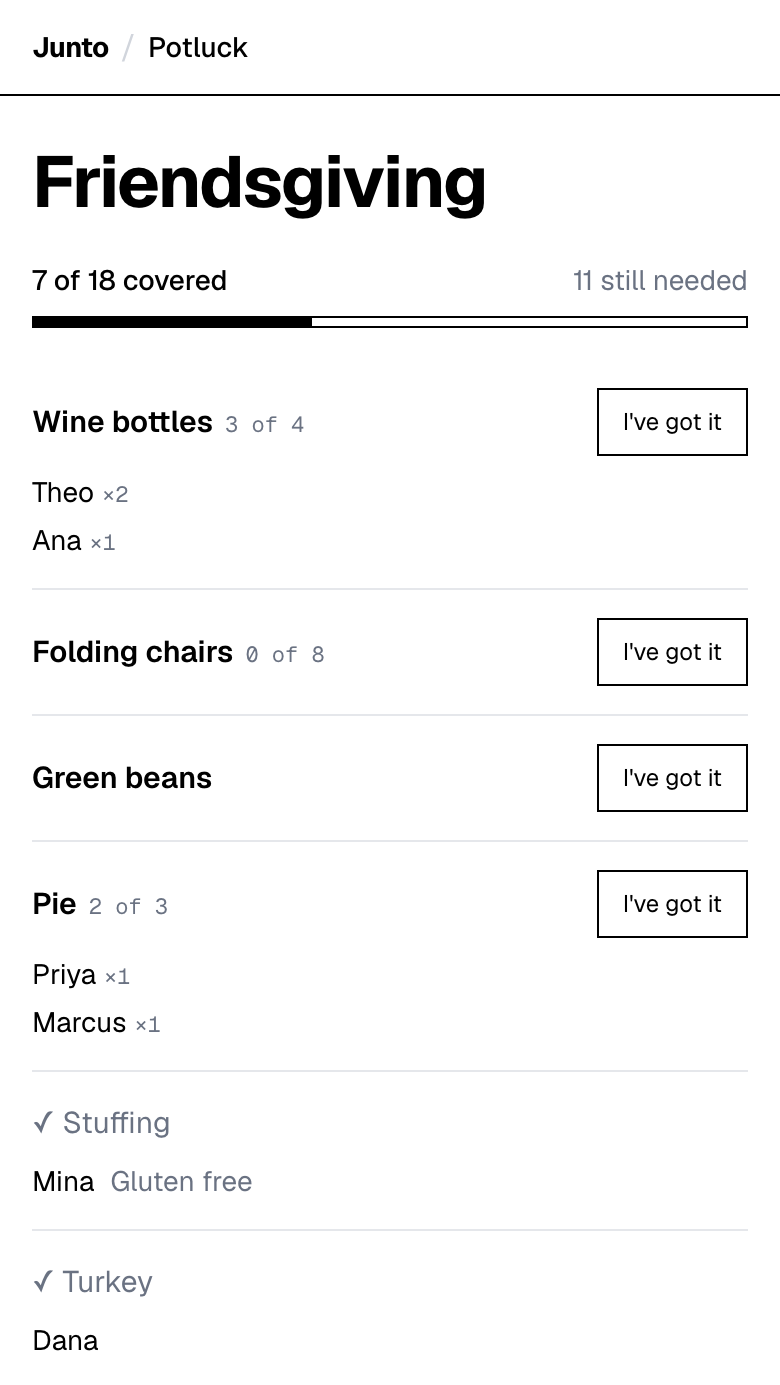
We make Junto, so weigh this section accordingly. The potluck page is free, has no ads, and asks guests only for a name. The organizer enters an event name, items with a quantity, their name and their email, and gets a guest link and an admin link. They create no password or account.
Quantities are the main feature. Several people can share one item, each picks how many they take, the page shows who has what, and an item closes when it is full. The organizer can let guests add items, edit details, change quantities, and remove items or sign-ups. Items can carry an optional note or link, such as "Gluten free" or a recipe URL. It is free text, not a dietary form. After taking an item, a guest can email themselves one copy of what they took, but the page sends no automatic reminders.
- Pros: one clean page, no ads, no account for guests, quantities that close.
- Cons: no reminders, no payments, no printable sheet, no recurring sign-ups. Notes are free text and cannot be edited by the guest afterwards.
- Best for: a one-off meal or event where you want a page your group will actually open.
Is SignMeUp the right tool?
SignMeUp, at mysignmeup.com, says its sign up sheets are ad free, that participants need no account and no app ("They open the link and tap a slot"), and that organizers can manage sheets from an iOS app. Its free plan allows up to 3 active sheets, 10 slots per sheet and a day-before email reminder. Waitlists auto-promote the next person when someone drops out.
The free plan has caps. Its pricing table says 25 sign-ups a month and its FAQ says 100, so check the current number if your potluck is large. Pro is $9 a month or $90 a year and adds more reminders, CSV and PDF export, custom branding and unlimited slots and sign-ups. SignMeUp beats Junto on reminders and waitlists.
- Pros: ad free, no guest account, a free day-before reminder, waitlists.
- Cons: free-plan caps on sheets, slots and sign-ups. We did not verify notes on items or how a full slot closes beyond its "spots open" count.
- Best for: a small sheet where a reminder and a waitlist matter more than a quantity you split between people.
Is Perfect Potluck the right tool?
Perfect Potluck is built for group meals. Its homepage says it is "Fast, Easy, and FREE", that it sends the invitations, and that it sends automated reminder emails. Coordinators find a sheet by last name and a password.
We could not verify from its page whether guests need an account, whether it shows ads, or how it handles quantities, so we make no claim about them.
- Pros: invitations and reminder emails, per its homepage.
- Cons: several facts we could not verify. Its homepage carries promotional banners for a sister site.
- Best for: organizers who want the tool to email the invitations and reminders.
What is the best app for potluck organizing?
Most of these tools are websites, not downloads, which is the point for guests. The best app for potluck organizing is the one your guests can open from a text without installing anything, so test the guest page on a phone first.
On what we could verify, SignMeUp has an iOS app for organizers while participants need none, and SignUpGenius and SignUp.com say participants need no account. Junto's potluck page is a web page with no app at all. If you want the best free option with reminders, that is SignMeUp or SignUpGenius. If you want the plainest free list with quantities that close, that is Junto.
Is Google Sheets the right tool?
A Google Sheet works for a small group of people who already use one. It is free, flexible and familiar.
It has no quantity lock. Two people can claim the same row, and anyone with edit access can change any cell. Our Google Sheets guide has the layout and the failure modes.
- Pros: familiar, flexible, no new tool.
- Cons: overwrites, duplicate claims, no quantity lock.
- Best for: a handful of coworkers with one-of items.
Are Google Forms and Jotform good for potlucks?
Both are general form builders, not sign-up lists. Google's help page says limiting a form to one response per person requires respondents to sign in to a Google Account. Jotform's free Starter plan allows 5 active forms and 100 monthly submissions and adds Jotform branding.
We did not verify a potluck-specific template or a quantity lock for either, so we do not recommend them for this job unless you already use them.
- Pros: custom fields, familiar tools.
- Cons: guests may not see what is taken, and a sign-in or a branding limit may apply.
- Best for: people who already live in these tools.
What should you check before you pick a tool?
Open the guest page as a guest would, on a phone, before you send the link. That takes two minutes and tells you more than any table.
- Does a guest have to make an account? If yes, expect the friend who ignores app invites to ignore this too.
- What does the guest see besides your list? Ads, upsells and branding all show up here, and on a free plan they may be part of the price.
- What happens when an item is full? The test is to try to claim the last unit twice from two phones.
- Who sends the reminders, you or the tool? If it is you, put it in your calendar now.
- Do you need money collected? If yes, only some tools do it, usually on paid plans, with a fee per transaction.
What does Junto not do?
The Junto potluck page has no reminders, no payment collection, no printable sheet, no RSVP on the page, no date or time field and no recurring sign-ups. It has no structured dietary field; the optional note is free text.
If you need any of these, pick another tool from this page. Junto is not a replacement for SignUpGenius when reminders or payments matter.
Which tools did we leave out, and why?
We tried to read Grasshopper SignUp, a tool people ask about, but every one of its pages (including grasshoppersignup.com/potluck-signup and /signupgenius-alternatives) returned an error on the check date, so it is not verified and we make no claims about it. We could not read Common Ninja or SharedTask either. Partiful describes itself on its homepage as free online invitations with RSVP tracking that guests can open without an app. We found no potluck sign-up list described there, so we did not compare it.
We will add a tool when we can verify its facts on its own page. If a vendor spots a mistake here, the date at the top tells you when we last checked.
Want the clean option? One page for your group chat. Guests tap an item and type a name. Free, with no account, no app and no ads.
Questions
What is the best free potluck sign-up tool?
It depends on what you need. SignUpGenius is free with reminders but shows ads to guests on its free plan. Google Sheets is free but has no quantity lock. Junto is free with no ads and quantities that close, but no reminders. Pick the one whose missing feature you can live without.
Which potluck sign-up tool needs no account for guests?
SignUpGenius says participants do not need an account. Junto asks guests only for a name, and its organizer gives a name and email but creates no account. Google Forms requires sign-in if you limit to one response per person. For Perfect Potluck we could not verify it. Check the guest experience on a phone before you send the link.
Which potluck sign-up tool has no ads?
SignUpGenius says ads may appear on free-account sign-ups and are removed on paid plans. Junto's potluck page has no ads. We could not verify ads for Perfect Potluck, and Jotform adds its own branding on the free plan. Open the sign-up as a guest before sharing it to see what your friends will see.
Which tool sends reminders?
SignUpGenius includes automated reminders on its free plan, and Perfect Potluck says it sends automated reminder emails. Junto does not send reminders, so you would message the group yourself. Choose a reminder tool if your guests are forgetful, or set a calendar alert for yourself.
Which tool can collect payment for a potluck?
SignUpGenius can, from its Starter plan, through Stripe with a fee of 5% plus $0.50 per transaction. Junto does not collect payment. If your potluck needs a contribution, pick SignUpGenius or ask in your own message. Decide first whether anyone is actually paying before choosing a paid plan.
Can a quantity be shared between several guests?
In Junto, yes: several people share one item, each picks how many they take, and the item closes when full. SignUpGenius describes slot limits. A Google Sheet has no lock, so two people can claim the same row. Check how your tool handles a full item before relying on it for a big group.
Is Google Sheets good enough for a potluck?
For a small group with one-of items, yes. It fails when people share quantities or claim at the same moment, because a sheet is plain cells. Junto closes an item when it is full. Read the Google Sheets guide for the layout, then decide whether your group is small enough to risk it.
Is there a free app for potluck organizing?
Yes, but most are websites rather than apps. Junto is a free web page with no app and no ads. SignMeUp has a free plan with limits and an iOS app for organizers. SignUpGenius is free to start. Open the guest page on a phone before you choose, then share its link.
What is the best free app for potluck sign up?
It depends on your missing feature. For reminders on a free plan, SignMeUp or SignUpGenius. For a plain list with quantities that close and no ads, Junto, which has no reminders. We list the trade-offs in the table above. Pick the one whose gap you can live with, then try it as a guest.
Why does this comparison say "not verified"?
It means we could not confirm the fact on the vendor's own page on the check date, and review sites do not count as sources. Junto would rather leave a cell honest than guess. Open the vendor's page to check a cell yourself, and tell us if you find a mistake.
Sources
- SignUpGenius: Is SignUpGenius free? (free plan, reminders, paid features, payment fee) (checked 2026-11-03)
- SignUpGenius: Why SignUpGenius has ads and how to remove them (checked 2026-11-03)
- SignMeUp (mysignmeup.com) homepage (checked 2026-11-03)
- SignMeUp pricing (checked 2026-11-03)
- SignUp.com pricing (checked 2026-11-03)
- Perfect Potluck homepage (checked 2026-11-03)
- Google Docs Editors Help: Limit responses in Google Forms (checked 2026-11-03)
- Jotform pricing (Starter plan limits and branding) (checked 2026-11-03)
- Partiful homepage (checked 2026-11-03)
Related
- Use cases: Potluck sign-up sheet: pages for every kind of event
- Guides: Potluck sign-up in Google Sheets: how, and when not to
- Use cases: Friendsgiving sign-up sheet that stops doubled dishes
- Use cases: Sign-up sheet for anything: volunteers, carpools, gear
- Compare: Free SignUpGenius alternative, and who should stay
Last updated 2026-11-03