A Thanksgiving potluck sign-up sheet your whole family can use
A family Thanksgiving potluck sign-up sheet should work for the relative who will not install anything. Send one link. They tap a dish and type their name, and nothing else is asked of them. Thanksgiving falls on Thursday, November 26, 2026, so the list should go out early.
Thanksgiving falls on Thursday, November 26, 2026. This guide covers what to put on the list, how to bring in the people who avoid apps, and what to do about allergies and cancellations.
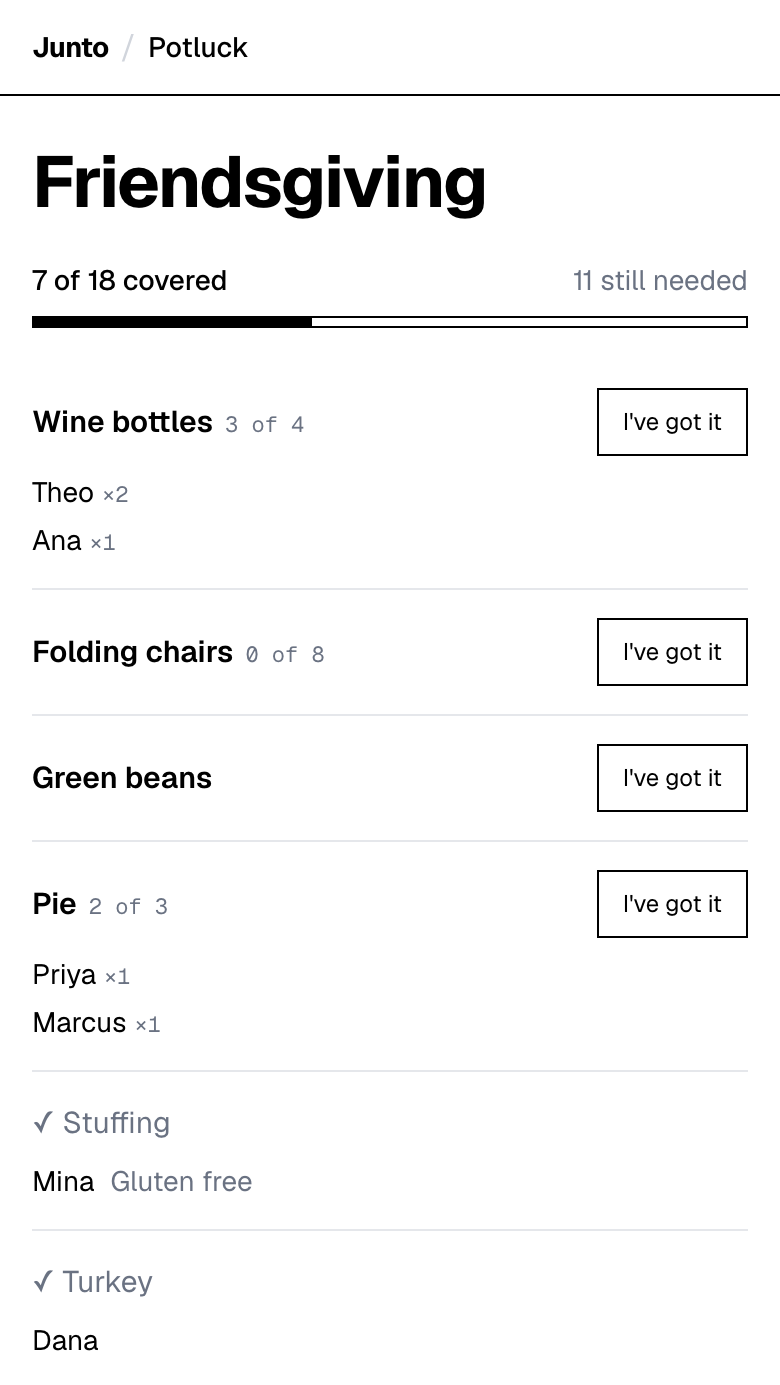
One link for the whole family. Tap a dish, type a name. Free, with no account, no app and no ads.
How do you run a Thanksgiving sign-up when some relatives avoid apps?
Choose a tool that asks the guest for nothing but a name. If a relative has to make an account, they will not, and you will end up taking their order by phone.
With a link-based page, the guest opens it from a text or an email, taps what they want to bring and types their name. There is no app and no password. You, the organizer, give your name and email once so the page can send you a guest link and an admin link.
The admin link is the one to keep private. It is how you edit details, change quantities and remove an item or a sign-up.
What is a Thanksgiving potluck list?
A Thanksgiving potluck list is the one place where every dish and its owner is written down, so the table has a turkey, sides, pie and drinks and nothing arrives twice. Give each item a number and the list closes it when it is full.
What goes on a family Thanksgiving sign-up sheet?
Put the dishes your table actually expects. Families have fixed dishes, and a sign-up that ignores them starts a fight.
Write each dish as its own item, with a number if your group needs more than one.
- The dishes that are always the same person: list them with their name already on them. Grandma's rolls do not need a vote.
- Two-of items: pies, bottles, loaves. Give them a quantity so the second pie does not become the fifth.
- The "someone has to" items: gravy, a vegetarian main, cranberry sauce, ice, extra chairs.
- Open slots: a few items marked "anything you like" for the cousin who never knows what to bring.
How do you get the least techy relative onto the list?
Make it a link they can open on whatever device they have, and make the first step obvious. The page asks for a name, so a niece or a neighbor can sit next to them and type it in.
If the relative will not touch it at all, add their dish as an item yourself and put their name in the item title, like "Rolls (Grandma)". The admin link lets you edit details and remove items, so a wrong entry is easy to fix.
The goal is not to convert anyone. It is to have one list that is right on Thursday.
How do you handle allergies and dietary needs in the family?
Put the need in the item name, for example "gluten-free stuffing" or "vegetarian main". A person who needs it will look for exactly that.
The tool also lets you, or a guest who adds an item, attach an optional free-text note or link. A guest who takes an item can add a note such as "Contains nuts". Be honest with the family about the limit: it is free text, not a dietary form, and guests cannot edit their note afterwards. For a serious allergy, ask the cook directly as well.
How do you keep the family dishes and the new dishes from clashing?
List the fixed dishes first, with the name of whoever has always made them. That tells the family the list respects tradition, and it stops a well-meaning newcomer from signing up for the dish somebody has made for twenty years.
Then add the open slots under them. A new cousin or a partner at their first Thanksgiving can pick something from the open part without stepping on anyone.
How do you handle several group chats and a few email-only relatives?
One link works everywhere. Paste the same guest link into every chat, and send it by email to the relatives who are not in any of them. Everyone ends up looking at the same list, so there is nothing to reconcile.
Ask one adult per household to sign for the household. Guests type only a name, so "The Garcias" is a valid entry, and it keeps the list readable.
When should the list go out?
Send it with the invitation, not after. Dishes get claimed in the first few days, and the people who answer late take what is left.
For a Thursday, November 26 dinner, a link posted by early November leaves three weeks for the slots to fill. The hosting timeline for Friendsgiving counts back from the date, and most of it works for a family dinner too.
What if someone cancels or changes their dish?
Open your admin link, remove the sign-up and post in the family chat that the slot is open again. You can also change a quantity or edit an item if the plan shifts.
The page does not send reminders, so the family chat is also your reminder. A message on Tuesday saying "check the list, two slots open" does the job.
What does a link-based sign-up not do for a family?
It does not send reminders, collect money, print a sheet, take RSVPs, or repeat every year. Each Thanksgiving needs a new page.
If someone in the family insists on paper, print a screenshot of the list. There is no built-in printable version, so a screenshot is the workaround.
For a comparison with tools that do send reminders or collect payment, see the best potluck sign-up tools. For the numbers, see who brings what by guest count.
One link for the whole family. Tap a dish, type a name. Free, with no account, no app and no ads.
Questions
What should be on a Thanksgiving potluck sign-up sheet?
List each dish as its own item, give a quantity to anything you need more than one of, and put your fixed family dishes on the list with names already attached. Junto lets you add every item with a number, so a full item closes. Start with the turkey and the dishes nobody can skip.
Do relatives need an account to use the sign-up?
No. A guest opens the link, taps a dish and types a name. There is no app and no password. The organizer enters a name and email once but creates no account. Junto does this with a plain page. Send the guest link to the family chat and keep the admin link to yourself.
How do I get older relatives to sign up?
Offer to do it with them. The page needs only a name and a tap, so you or a younger relative can enter a dish beside them in under a minute. Junto has no app to install, which removes the usual obstacle. Send the link by text or email and follow up with a phone call.
Can I see who is bringing what before the day?
Yes. Everyone with the guest link sees each item, how many are left and who took the rest. That is how a cousin knows the sweet potatoes are covered before they shop. Junto shows it on one page. Check it a few days ahead and fill any gaps in the family chat.
Does the sign-up send reminders to the family?
No. Junto does not send reminders, and it has no RSVP on this page. Post a message in the family chat two days before and again the morning of. If you need automatic reminders, SignUpGenius includes them on its free plan, though its free sign-up pages can show ads to guests.
Sources
- SignUpGenius: what the free plan includes (reminders, no account for participants) (checked 2026-11-03)
- SignUpGenius: ads on free sign-ups (checked 2026-11-03)
Related
- Use cases: Potluck sign-up sheet: pages for every kind of event
- Use cases: Friendsgiving sign-up sheet that stops doubled dishes
- Guides: Thanksgiving potluck ideas for the organizer: 12 ways
- Guides: How much food for a potluck: sourced amounts and times
- Compare: Best potluck sign-up tools, compared with dated facts
Last updated 2026-11-03