A church potluck sign-up sheet that members can use without an account
A church potluck sign-up sheet should let any member claim a dish from one link, with no account and no app. Put every dish on a list with a number, send the link by email or text, and each person taps an item and types a name. It is free, and a full dish closes.
This page covers how to organize a church potluck, what to put on the list, what to bring, theme ideas, and what the sheet cannot do. It has no printable version, and we say so plainly.
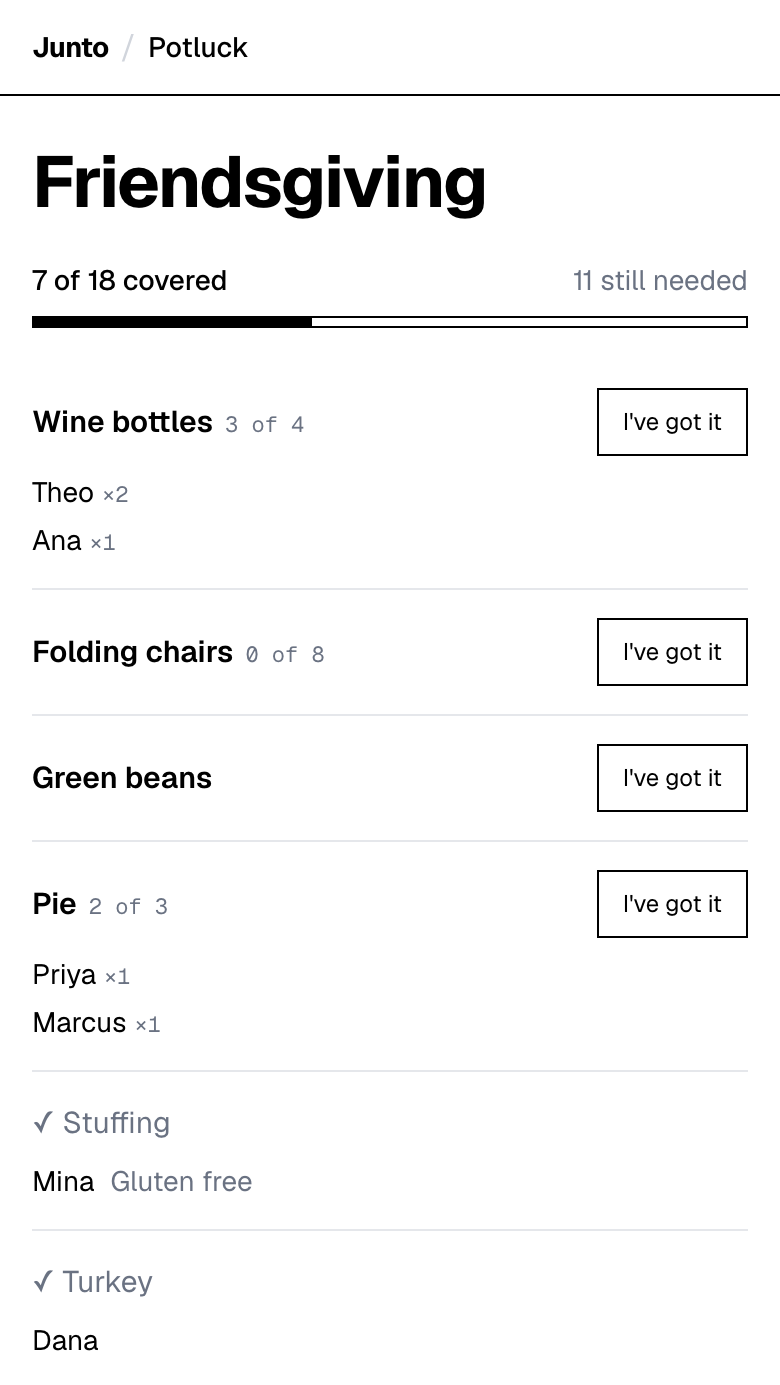
One link for the email list. Members tap an item and type a name. Free, with no account, no app and no ads.
How do you organize a church potluck?
Pick one person to run the list, so members know who to ask. Then work through five steps.
- Set the date and the room. Put the date in the event name, because the page has no separate date field.
- Estimate the headcount. Ask in the email or the announcement who is coming. A rough number is enough to size the list.
- Divide the list into zones. Mains, sides, salads, desserts, drinks, and gear such as plates, cups, serving spoons and tablecloths.
- Put a number on every line. "Desserts, 6" fills up, while "desserts" collects ten of the same pie.
- Share one link and check in once. Send it by email or text, and a few days before look at what is still open.
What should a church potluck sign-up sheet include?
With a large group, zones keep the list readable. Name the slots a grocery run can fill, so members who do not cook still have a way to help.
A recipe that yields 50 one-cup servings feeds 50 people if each takes one serving, according to the University of Minnesota Extension. Use that rule to ask for fewer, larger dishes from a few people rather than a small dish from everyone. We found no sourced per-person amount for sides, desserts or drinks, so we give none.
- Mains: casseroles, slow-cooker dishes, a ham or turkey.
- Sides and salads: one line per kind, so you can see the mix.
- Desserts: with a number, not a category.
- Drinks: water, coffee, juice, with a count of containers.
- Gear: plates, cups, napkins, serving spoons, extension cords for slow cookers, and folding tables.
- Setup and cleanup: one line each, so the same people are not always asked.
What should you bring to a church potluck?
Check the list first, then bring an open slot that travels well. A dish that serves a crowd, holds its temperature and needs no oven at the church is the safest choice. Slow-cooker dishes, baked pasta, salads that keep, rolls and sheet-pan desserts all fit.
Label the dish with its name and main ingredients. If you are bringing something you do not cook, a store-bought dish is a perfectly good contribution, and a drink or a pack of plates is a real slot. On the sign-up you can add a short note when you take an item, such as "Gluten free".
What are some church potluck themes?
A theme gives members a way to choose, and it shrinks the pile of sameness. These are ideas, not rules.
- Soup and bread: each person brings one soup or one loaf. Hot soups need slow cookers, so put cords on the list.
- Around the world: each family brings a dish from their own table or their own family.
- Dessert night: dessert slots with numbers, plus coffee and tea.
- Breakfast for dinner: egg dishes, breads, fruit.
- Family recipes: each person brings a dish and a card with the recipe name.
- Seasonal harvest: dishes built on what is in season where you live.
How do older members sign up without an account?
They do not need one. A member opens the link in a browser, taps an item and types a name. There is no app to install and no password to remember.
Some members will still prefer to call. Anyone with the link can type a name, so a volunteer can open the page and enter that member's name for them. Say that in the announcement: "If the link is a hassle, call the coordinator and we will add you."
The page is plain on purpose. It has the list and nothing else, no ads and no sign-in screen.
How do you share the link by email, text or the bulletin?
Email and text are the easy routes: paste the guest link and one sentence. Junto's potluck page at tryjunto.app/potluck is a free sign-up list where guests tap an item and type a name.
A paper bulletin is harder. The page has no QR code and no printable sheet, so a printed bulletin can only carry the link typed out, which some members will find fiddly. Put the link in the email newsletter too, and name a person to call for help.
Keep the admin link to yourself. It lets you edit details, change quantities and remove items or sign-ups, and you can let members add their own dishes.
How do you keep food safe at a large potluck?
Under USDA guidance, perishable food is out of the safe zone after 2 hours on the table, and after 1 hour once the room is above 90 degrees F. Keep hot dishes at 140 degrees F or warmer and cold dishes at 40 degrees F or colder.
At a big meal, that means slow cookers for hot dishes, ice or a refrigerator for cold ones, and a plan to put food away at the end. Add "extension cord" and "cooler with ice" to the list as items.
What are the limits of this sign-up?
The sign-up has no automatic reminders, no payment collection, no printable sheet or PDF, no QR code, no RSVP, no recurring sign-ups and no time-slot grid. It has no structured dietary field, only an optional free-text note, and members cannot edit their own sign-up afterwards.
For a weekly meal that repeats, or a volunteer schedule with shifts, a heavier tool fits better. The comparison of potluck sign-up tools says which, and SignUpGenius alternatives covers leaving it.
One link for the email list. Members tap an item and type a name. Free, with no account, no app and no ads.
Questions
Is there a free church potluck sign-up sheet?
Yes. Junto makes one free: you list dishes with quantities and share a guest link by email or text. Members tap an item and type a name, with no account or app. It is online only, with no printable version. Write your list and send the link to your members.
How do I organize a church potluck?
Pick one coordinator, set the date, estimate the headcount, and divide the list into mains, sides, desserts, drinks and gear. Put a number on every line. Junto gives you a guest link to email around and an admin link to keep. Check the list a few days before and fill gaps by asking.
What should I bring to a church potluck?
Check the sign-up for an open slot, then bring a dish that serves a crowd and travels well, such as a slow-cooker dish, baked pasta or a sheet-pan dessert. Label the ingredients. Junto lets you add a short note when you take an item. Store-bought is fine, and so are drinks and plates.
Can members sign up without an account or an app?
Yes. They open the link, tap an item and type a name. Junto needs no account, app or password from members. If someone prefers the phone, a volunteer can type their name into the page for them. Say that in the announcement so nobody feels left out.
Can I print a church potluck sign-up sheet?
Not from this tool. Junto has no printable sheet, PDF or QR code, so a paper bulletin can carry only the typed link. Send the link by email or text as well, and name a person members can call. If paper is essential, choose a tool that prints.
Sources
Related
- Use cases: Potluck sign-up sheet: pages for every kind of event
- Guides: How to organize a potluck: six steps and a list example
- Guides: How to ask guests to bring a dish: 10 messages to copy
- Guides: How much food for a potluck: sourced amounts and times
- Compare: Best potluck sign-up tools, compared with dated facts
Last updated 2026-11-03