Can people sign up on an online sheet without an account or login?
Yes, people can sign up on an online sheet without a login or an account. On most sign-up sites the person who makes the sheet has an account and the people who sign up do not. They open a link, pick an item and type a name.
Below is how to make a free sign-up sheet online in three steps, which tools say guests need no account, and the honest limits.
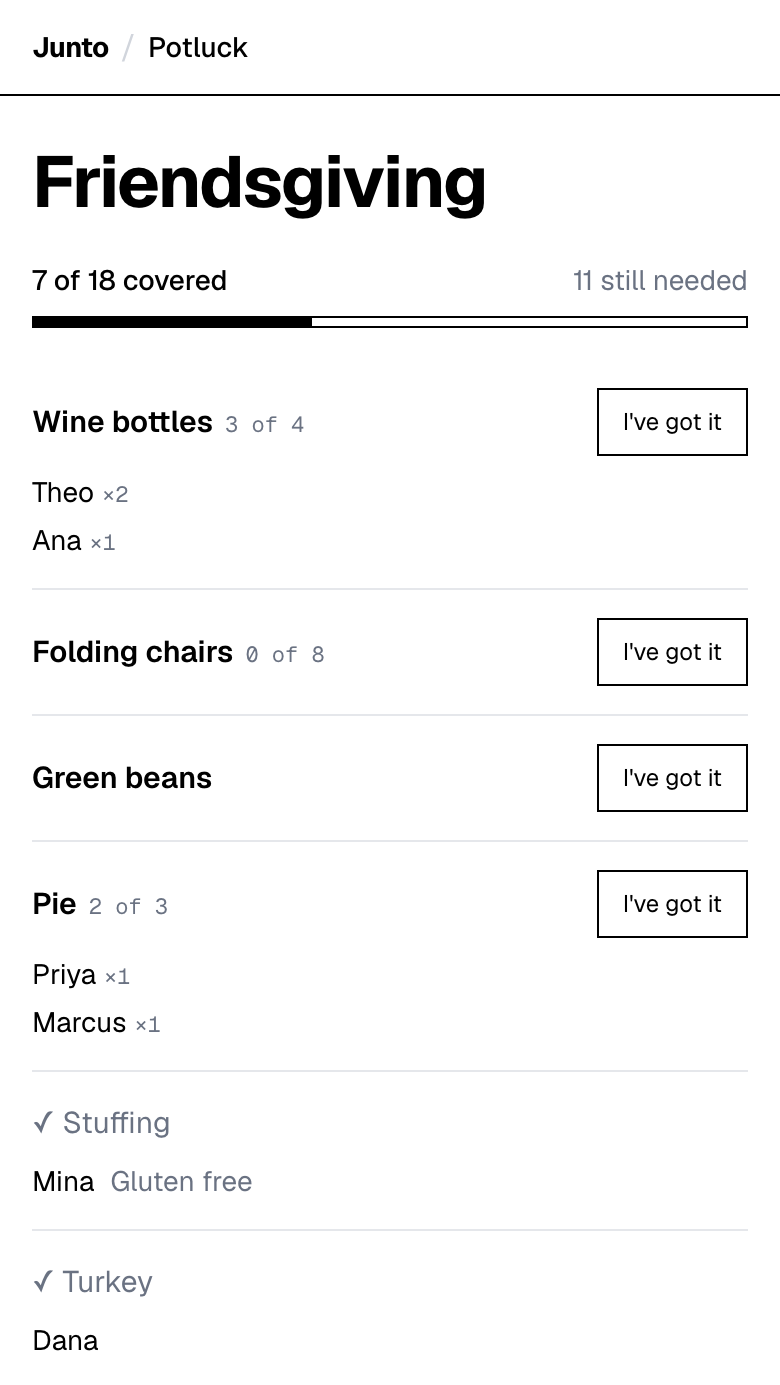
Make a sheet in a minute. Guests tap an item and type a name. Free, with no account, no app and no ads.
How do you make a free sign-up sheet online?
Junto's potluck page at tryjunto.app/potluck is a free sign-up list where guests tap an item and type a name. Making one takes three steps.
- 1. Name the sheet and list the items. Give each item a quantity, so an item that is full closes. Put any date in the name, because the page has no date or time field.
- 2. Enter your name and email. You get a guest link and an admin link. You create no password and no account.
- 3. Share the guest link. Post it in a group chat, an email or a team channel. Keep the admin link for yourself.
Which sign-up sheet websites need no login for guests?
Four we could check say so on their own pages, checked 2026-11-03.
- Junto: guests type a name. No account, no app, no ads.
- SignUpGenius: its homepage says "No account required for participants".
- SignMeUp (mysignmeup.com): participants "open the link and tap a slot" and need no app.
- SignUp.com: its pricing page says "No Passwords for Participants".
Which options do need a login?
Google Forms asks people to sign in to a Google Account when you limit a form to one response per person. A Google Sheet depends on how you share it, and anyone you give edit access can change any cell. Our Google Sheets guide covers where that breaks.
A calendar or an app that wants every guest to install something is the other common case. If your group includes people who avoid downloads, test the link on a phone with no account before you send it.
What is the limit of a sheet with no login?
No login does not mean no limits. This sheet has no time slots, no automatic reminders, no payments, no printable version, no RSVP and no recurring sign-ups. A guest cannot edit their own sign-up afterwards, but you can edit details and remove items or sign-ups from the admin link.
If you need those features, the sites above do more. SignUpGenius says it has locked slots, start and stop times, waitlists and automatic reminders. SignMeUp has a day-before reminder on its free plan. Our SignUpGenius alternative page shows the full comparison.
Make a sheet in a minute. Guests tap an item and type a name. Free, with no account, no app and no ads.
Questions
Can people sign up without an account?
Yes, on the sites we checked. SignUpGenius, SignMeUp and SignUp.com each say participants need no account, and Junto asks guests only for a name. The person who creates the sheet usually has an account or gives an email. Open the guest page on your phone before you share it.
How do I create a free online sign-up sheet?
Name the sheet, add items with quantities, and share the guest link. With Junto you enter your name and email to get a guest link and an admin link, and you create no password. Put the date in the name, since there is no date field. Make yours, then post the link.
Is an online sign-up sheet free?
Some are. Junto is free with no ads. SignUpGenius is free to start but shows ads on the free plan and charges for payments. SignMeUp has a free plan with limits. Check the limits on a plan page before you promise a big group a spot. Start with the one that matches your needs.
Can I use a sign-up sheet for a group without time slots?
Yes, if you only need names next to items, such as a potluck, supplies or volunteers by task. Junto has no time slots or reminders, so it is not for shifts. For shifts, try SignUpGenius, which describes slots and start and stop times. Decide which you need first.
Sources
- SignUpGenius homepage ("No account required for participants") (checked 2026-11-03)
- SignUpGenius: features (slots, start and stop times, waitlists, reminders) (checked 2026-11-03)
- SignMeUp (mysignmeup.com) homepage (checked 2026-11-03)
- SignUp.com pricing ("No Passwords for Participants") (checked 2026-11-03)
- Google Docs Editors Help: Limit responses in Google Forms (checked 2026-11-03)
Related
Last updated 2026-11-03