How to make a shared calendar with your friends, no login
To share a calendar with your friends without a login, make one calendar, post its link in your group chat, and have each friend type a first name. Nobody creates an account, downloads an app or picks a password.
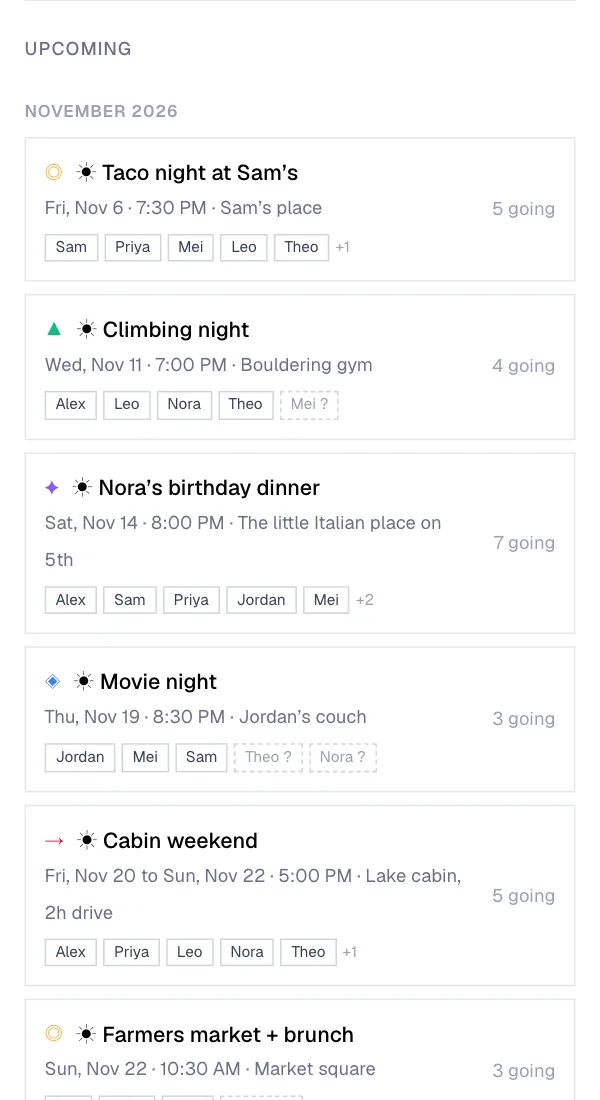
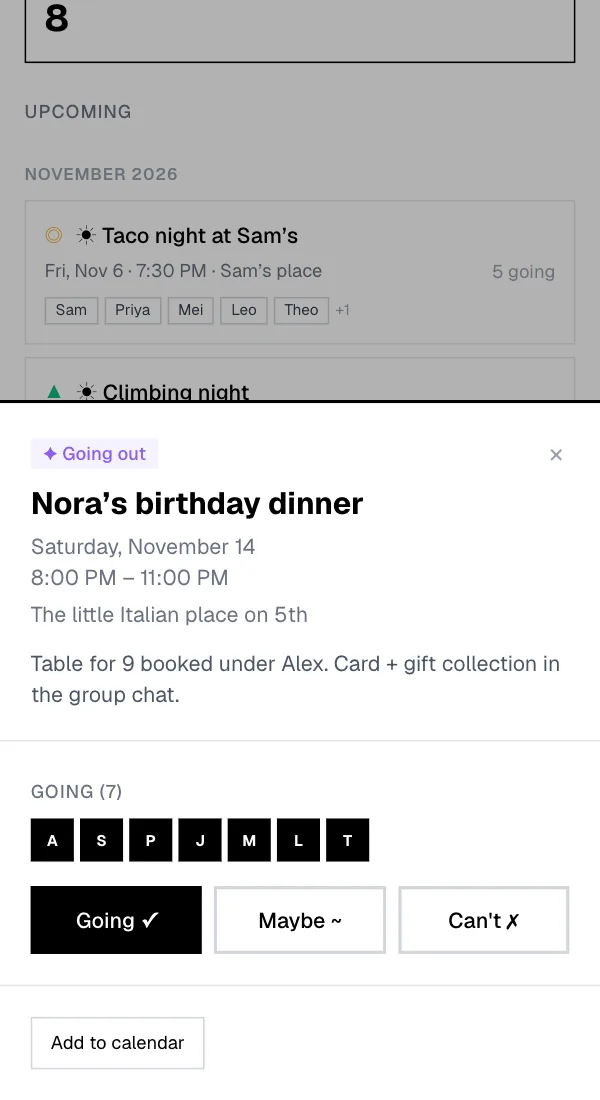
The part most no-login calendars skip is the answer. In Junto, every friend can add plans, and every plan shows who is going, who might come and who can't, by name.
Free for up to 8 friends on a private calendar. No account for anyone.
Set up a shared calendar for your friends in five steps
You can do all of this on a phone.
- Create it. On tryjunto.app, name the calendar, choose private (only people with the link and code) or public, and type your own first name.
- Choose who can add plans. "Everyone" lets every friend add and edit plans. "Admin only" keeps that to you.
- Post the link in the group chat. For a private calendar the link already carries the invite code, so a friend only types a first name. The browser remembers them after that.
- Add the first plans. A dinner on Friday, a trip that spans a long weekend, or a weekly plan that repeats on the weekdays you pick.
- Let people answer. Each friend taps Going, Maybe or Can't on a plan, and everyone sees the names.
Why a friend group needs names, not only a link
A link anyone can open solves the login. It does not tell you who is coming on Friday. Teamup, for example, needs no login and shares by link, but its own help pages say it "does not currently offer an RSVP system" (checked September 2026), and its free plan stops at 5 users.
A public Google Calendar link has the same gap: it is view only, with no way to answer, and sharing a calendar privately needs a Google account for every friend. A group chat has the names and the answers, but Tuesday's plan is buried by Thursday.
Junto keeps the link and adds the name. Each friend is a first name on the calendar, so a plan shows who said yes, and the friends who have not answered yet appear as No reply.
Shared calendars for a friend group, compared
Every option below works for friends in some way. The difference is whether a friend needs an account, and whether a plan can show who is coming.
Shared calendars for friends: account, answers and price
| Account for friends | Who is going, by name | Free plan | Paid plan | |
|---|---|---|---|---|
| Junto | No, a first name | Yes: Going, Maybe, Can't and No reply | Private calendars up to 8 members; public calendars with no member limit | One-time $4.99 plus tax per calendar for unlimited members, no subscription |
| Teamup | No, access by link | No ("does not currently offer an RSVP system") | 5 users, 5 sub-calendars, 1 year of history | Plus $12/mo billed yearly, $15 monthly |
| Google Calendar | Yes, to share a calendar; a public link is view only | Per event, by email invite | Free | Free |
| BCalendar | No | No RSVP and no named members | No limits stated | None, "100% Free Forever" |
| A group chat | You are already in it | In the thread, until it scrolls away | Free | Free |
Competitor facts from each vendor's own pages, checked September and November 2026 (sources below). Junto facts checked on tryjunto.app on 9 November 2026.
Plans a friend group can keep on one calendar
The calendar is for the plans you make again and again, not one party invitation. These are the ones it handles well.
- A weekly or every-other-week plan, such as a Monday run or game night, repeating on one or more weekdays you pick, up to 52 dates. Each date has its own answers.
- A trip as one plan across several days, with its dinners and outings as separate plans people answer one by one.
- A dinner where people bring food, with an optional bring list on the plan: list what is needed with a number, and friends take an item.
- One plan shared on its own. Every plan has a link with its own preview, so you can post Saturday's plan in the group chat and it opens right on that plan.
- Your own calendar, too. Each friend can add a sync link to Google Calendar, Apple Calendar or Outlook, so the group's plans show up next to their own. It syncs one way.
What this friend calendar does not do
It has no chat, so keep talking in your group chat and use the calendar for the plans. It does not sync both ways with Google or Apple Calendar, and it cannot show when everyone is free; to find one date first, a poll tool is the better start.
Access is saved in each friend's browser. A friend on a new phone opens the link again and types their name, or uses the email they added. A private calendar is free up to 8 members; a bigger group pays $4.99 plus tax once, for that calendar.
Free for up to 8 friends on a private calendar. No account for anyone.
Questions
Can I make a shared calendar with friends without anyone logging in?
Yes. With Junto you create the calendar, post its link in your group chat, and each friend types a first name to join. Nobody makes an account or a password, and the browser remembers them next time. Friends can add plans and answer Going, Maybe or Can't. Create the calendar first, then paste the link where your group already talks.
Do my friends need to download an app?
No. Junto runs in the browser on any phone or computer, so iPhone and Android friends open the same link and see the same plans. There is nothing to install and no app store page. If a friend wants the plans in their own calendar app, they can add a one-way sync link to Google Calendar, Apple Calendar or Outlook from the calendar page.
Is a shared calendar for friends free?
A private Junto calendar is free for up to 8 members, and a public calendar has no member limit. A bigger private group pays a one-time $4.99 plus tax for that one calendar, with no subscription and no renewal. Start free with your closest friends and unlock it only if the group grows past eight people.
Can my friends add their own plans?
Yes, if you choose "everyone" when you set it up. Then every member of the Junto calendar can add and edit plans, not just the person who made it. Choose "admin only" if you want to be the one who posts plans while friends only answer. You can change the setting later from the calendar's settings.
How do I see who is coming to a plan?
Open the plan. Each friend answers Going, Maybe or Can't, and Junto shows the names under each answer. Members also see who has not answered yet, listed as No reply, which makes it easy to nudge the right people in the group chat. Post the plan's own link in the chat to collect the missing answers.
Is Teamup a good calendar for a friend group?
Teamup is good for a shared schedule anyone can open by link, with sub-calendars and link permissions. Its help pages say it does not currently offer an RSVP system, and the free plan stops at 5 users. If your friends need to answer plans and see who is coming, Junto is built for that. Pick by whether you need answers or only a schedule.
Can we set up a weekly plan, like every Monday?
Yes. When you add a plan in Junto, set it to repeat every week or every two weeks on the weekdays you pick, such as Monday or Monday, Tuesday and Friday, or once a month. A series can have up to 52 dates, and each date keeps its own answers. Add the first date, choose the repeat, and save.
How do I share one plan in our WhatsApp group?
Open the plan and tap Share. Every plan in Junto has its own link with its own preview, so the group sees the plan in the chat, and tapping it opens the calendar on that plan. On a private calendar the preview shows only the calendar name and "You're invited". Paste the link and ask people to answer.
What happens if a friend switches phones?
Access is saved in the browser, so on a new phone the friend opens the calendar link again and types their name. If they added an email address, Junto can send them a link to get back in as the same person. Nothing is lost, because the plans and answers live on the calendar, not on the phone.
Sources
- Teamup pricing (checked 2026-09-23)
- Teamup knowledge base: RSVP system (checked 2026-09-23)
- Google Calendar Help: Share your calendar with someone (checked 2026-11-06)
- Google Calendar Help: Make your calendar public (checked 2026-09-23)
- BCalendar pricing (checked 2026-09-23)
Last updated 2026-11-11